Wednesday, May 6, 2009

On the set of the "Librarians"


I recently spent the day on the set of "The Librarians" Series II. It was a fantastic day. I was introduced and treated as a VIP. I liked that. The people there are very much down to earth, some very funny and all are hard working. The series shows in June.

Wednesday, October 8, 2008


There it is. I have got a bit of riding in over the past month or so. The weather is starting to fine up even more so hopefully I will get some good days riding ahead. Holidays next week so perhaps in the second week I may get to go on a trip somewhere.

Thursday, August 21, 2008

New Harley

Thought that I should add a post seeing that it has been so long since the last.
Bought myself a new Harley Davidson the other day. It is a 2008 model 1200 custom Sportster. It`s colour is black and I have customised it with the beaut mufflers to give it the Harley sound and also I added a tacho which sits nicely above the speedo. Only ridden it once from the shop to home. The weather isn`t so good for riding but will get the chance to run it in soon when the weather picks up a bit. Will post a photo or two shortly. Planning a holiday at the moment. Maybe another cruise, however I need to go and build a shed at St. Arnaud and also paint the roof so first things first.

Thursday, March 20, 2008

Litlovers

I have just finished going through an exercise of the Learning 2.1 program.
The program can be found at http://explorediscoverplay.blogspot.com/
The exercise was all about book clubs and the topics that are involved with running one. It even shows how to start one. You can find information at http://www.litlovers.com/
I had a look at how to disect what is written in a book, which was interesting.
The website discusses the different aspects that are involved with book clubs.
One of the links were LitClub. You can find information on bookclubs through any of the links below. It shows great ideas for book clubs! Here are a few ideas shown below or go to the litlovers site shown above and go through the course and explore, discover and play for yourself.
Reading guides can be found at http://www.litlovers.com/litguide.html
At this link there are book reviews, summaries, and discussion questions.
Most popular books can be found at http://www.litlovers.com/litclub.htm
The link shows the top book club choices that clubs are reading.
Books that are recommended can be found at http://www.litlovers.com/litpicks.htm
3 of LitLovers favorites are reviewed each month. How to discuss a book can be found at http://www.litlovers.com/discussion.htm. There are tips to help you with book club discussions. Questions for fiction can be found at http://www.litlovers.com/questions_f.htm. There are generic book questions for novels and memoirs. Questions for Non-Fiction have questions for nonfiction works. Follow the link at http://www.litlovers.com/questions_nf.htm to find questions that you may want to ask. Read, Think, Talk does exactly that. There is a chart that gives guidance on topics that you might like to think and talk about books. You can go to the link at http://www.litlovers.com/howtoread.htm. The menus and recipes link lets you click on to different parts of the world that you might like to discover recipes from. The recipes link can be found at http://www.litlovers.com/litfood.htm. The Fun Icebreakers links is just that. There are some suggestions on how to make fun at book clubs. Find these at http://www.litlovers.com/icebreakers.htm. There are games and activities to jumpstart your meetintgs. The link discussing how to start a book club can be found at http://www.litlovers.com/organize.htm. It has a step-by-step-guide for organising a book club. There is a link with information on how to run a book club at http://www.litlovers.com/structure.htm. There are tips to help structure meetings and select your books. There is even information to get young people hooked on books. This can be found at http://www.litlovers.com/litkids.htm

Thursday, December 13, 2007

Try this game. It`s fun

Guess the Google search term game
http://grant.robinson.name/projects/guess-the-google/game.php?l=5

Wednesday, November 28, 2007

Mystery Man: Vanuatu

Saturday, November 24, 2007

Vanuatu


Pictured here is me with the chief of Pentecost Island. It is an island in the group of South Pacific islands of Vanuatu. I was there in June to celebrate my birthday. It was good to escape the Melbourne winter. Oh by the way, the chief is the one on the right. So there you have it,
Mystery Man has been exposed for all to see.


When I was cruising I felt that the people of the islands were very welcoming. It amazed me the way that these people live. It seemed primitive
in a lot of ways. It made me realise that I take
things for granted in my day to day life.


I thought that I had the courage to hold the snake. Not so. I decided to be a bit cheeky.


Saturday, November 3, 2007

It`s all over???

It`s all over, or is it just the beginning.
The exercise started off being difficult but now that it has ended I have found that it wasn`t difficult to have a play with it all. I have created many accounts, too many, with too many usernames and passwords. What will be interesting to see is if we will use them or not. One positive thing to come out of the exercise is that we now know tools that are available to us, and others, concerning Web 2.0 technologies. Now that the exercise is finished I think that a good idea would be to go back and play further with what we have created. During the exercise, having talked with people and played with what we have been learning, I have discovered that there are many more different things that can be done with blogging, such as networking with others and some are cosmetic, such as backgrounds, bells and whistles. Personally I have found most of the exercises to be bookmarking related. One thing that has come out of this has been finding links and creating subject headings through tagging. An example would be delicious and some of the other accounts that have been made on my blog.All in all a really good experience. Now to go back and tidy up my blog and have a play with it all. I would like to take this opportunity to thank Leslie and Lynette for the help and support that they have given over the past month or so.

Thursday, November 1, 2007

eBooks #22


I searched for eBooks. Good sites, although of the first 5 books that I tried to find I didn`t have any success in locating them. Instead, I searched for what the authors of the website called popular books. An interesting way to read a book. Some of the suggested sites required membership (I didn`t bother). I was listening to the radio and heard that if all internet users participated in a program to type published books held by National Libraries, it would take approximately 2 years to have all of these books posted onto the internet.
Read for free online at:
http://www.gutenberg.org/browse/scores/top

You Tube #20

You could definately use a You Tube video to show people how to renew their loans or to search the catalogue. Probably many other uses as well.
I have chosen to add one of the most watched You Tube videos of all time. It is called the "Evolution of Dance".

Also another one called "The Librarian"http://humelib2.blogspot.com/2007/10/20-you-too-can-youtube-listen-to-this.html
The exercise was fun, however there is a lot of junk out there.
http://www.youtube.com/

Wednesday, October 31, 2007

Search tools for locating podcasts #21

I used http://podcast.com/ to locate podcasts that I wanted to find. I inserted a feed to my other group of feeds that shows me library books and library talk. Podcasting could be used in a library setting to source current topics or materials. I found the podcast exercise to be useful in some ways. I checked out http://www.podcast.net/ and found that this could be useful as well

Web 2.0 Awards "Clipmarks" #19

This was this first thing that I found that may have been of interest to me in Clipmarks.

Web 2.0 Awards Clips #19


To clip a website is to save the best parts of that site. You choose the best part and clip it.
You can save your clips privately or add them to the public library, use ClipSearch to find what you or others have clipped, post clips directly to your blog with "Clip-to-Blog", email clips to your friends or just print just the pieces of the page you want. The final task mentioned would be useful in a library where people would like to print part of websites and not the entire page.
Everything you clip is added to your own fully searchable library of things you find on the web.
You can organize your clips by adding tags (keywords) to them, or by putting them in collections. You can search, sort and browse all of your clips on your own clipmarks page,auto-post your clips to your del.icio.us account or get RSS feeds for all or any subset of your clips.
When you save clips publicly, you're adding to a global library of interesting things people have found online.
Other people can add comments to your clips and pop their favorites to the top for others to see. It's a way to show what you find on the web and meet people who share your interests.
What I liked about the tool is that if you were browsing you could see items that you may be interested in but wouldn`t have thought to look for. You can also search by tags to help find information on certain topics.

Saturday, October 27, 2007

CHAT ROOM (Zoho Chat

You may only chat if you have permission. For me to grant permission you will need to fill in the form on previous post and only then will I consider adding you to my chat list which will then enable you to chat with me.
You can add the form and chat through Zoho Writer. Quite a cool tool don`t you think. Jump on board.
www.zoho.com


WHO IS VISITING? Zoho Writer (Forms)

Please fill in the form so that I know who has visited.


Tuesday, October 23, 2007

THE NEEDS FOR FEEDS #8


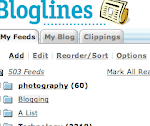
Creating the feeds that I have chosen is proving to be very useful. I no longer have to go back and search for particular websites over and over again. It is the same as bookmarking. Regular updates to sites that I have chosen, I hope, will make this interesting.
www.bloglines.com

Monday, October 22, 2007

FLICKR FUN


I found this template easy to use and it seemed that it was very popular with other bloggers (probably because it is easy to use). It is interesting to see that you are able to add an image and also text to the image. My blog is getting a bit overcrowded so I think that I will need to make some alterations to the way it is all displayed.
Make up your own signs at http://www.txt2pic.com/

Sunday, October 21, 2007

My perspective on Library and Web 2.0 Technologies #15


I believe that Web 2.0 has a place in libraries. With increased focus on the technology, people will learn more from it with increased use through experience. This will improve both the way that people do things, and improve the way in which libraries deliver a wider scope of information and services to people. It will encourage people to be active in libraries. Web 2.0 will make peoples lives easier and make things more interesting. People will have the ability to access a wider variety of information over the net and once they access the information, people could use it better than at present whether it be to store and organise it.
Library professionals should be encouraged to learn Web 2.0 technologies in order for the industry to make these learnings more available and beneficial to the community. The way that the youth of today are progressing they will need library professionals to be aware of the technology. Libraries will need to keep up with the Web 2.0 technologies to be able to keep up with public demand. It is written that of all the information technology industry shortfalls, people with Web 2.0 experience or qualifications are the highest ranking.
What am I doing working in a library. Ha

Thursday, October 18, 2007

ZOHO SPREADSHEET TO BLOG #18

"http://sheet.zoho.com/publish.do?docurl=oNg955zQJSMW%2FXIzbS%2FWDw%3D%3D&name=9LWnDf2HkuAbb5mAvBO19Q%3D%3D


Quite a useful tool. There are 2 ways to add a sheet to the blogs. One way is to add a link to the blog after making a sheet in Zoho just like the one that you can see at the top of this post. This way doesn`t give you the functionality of a Microsoft Excel spreadsheet. The other way is to use a Microsoft Excel spreadsheet, save it to your computer, go to Zoho Writer and import the sheet and export it to the blog using a cut and paste method of the HTML that gets displayed to embed the sheet into your blog post. It will appear in the post like the one that is displayed in this post.
www.zoho.com

ZOHO WORD PROCESSOR TO BLOG #18

Just trying out this Zoho online editor. After several attempts I think that I am now able to send this document to my blog. All that you need to do is start your Zoho account, make a document, save it at the Zoho toolbar of your document. Look on the left hand side of the screen and you will see "My Docs". Go to the document that you want to post to your blog, right click on it, go to "send to"and click on "blog this page". We will see.

I have also found that you can make your document in Zoho word processor, click save, click publish, type in your email username and password to the dialogue box that appears and click send to blog.
www.zoho.com

Tuesday, October 16, 2007

INSIDE WIKI #16


I`ve just had a look at some different Wiki`s. The SJCPL subject guide,(http://www.libraryforlife.org/subjectguides/index.php/Main_Page) I can see would be useful, and similar to an everyday library catalogue subject search, only better. Library staff are able to edit the site. Currently Hume are implementing a similar project, however, as far as i am aware only one person is able to edit in a way that links will be added to the library catalogue.

It isn`t the same as a Wiki although it operates in a similar way to the link mentioned above (I think). This particular one may be easier for the average person in the street because it has links to different or similar subject matter, wheras the catalogues in libraries, I feel are rigid and sometimes not easy for people to look at. This subject heading site is more like a website than a catalogue but does the same job as a catalogue. Most people that are using blogs would feel more comfortable with using the internet rather than using a library cataloue. The only problem that I found is that once you click onto links, you get advertising (which I don`t like to see) and also there are many choices for further links to subject matter that initially you had no intention of looking at, creating a distraction. This only applies if you were browsing. If you had a particular topic to find and wasn`t just browsing, then I would say that it a very good tool.
Some of the other Wiki`s that I looked at didn`t impress me at all. They seemed to jump around all over the place like a bull at a rodeo or they were irrelevant because they were all from the U.S. and I couldn`t see any use for them myself. There were a couple of very well structured ones that I would use if they were in my neighbourhood. I will list them below.

http://wiki.ucalgary.ca/page/Main_Page
http://liswiki.org/wiki/Main_Page

There were a couple of websites that I think would be useful for making a Wiki and also creating online surveys just as a topic of interest.

http://trainingwiki.pbwiki.com/

Saturday, October 13, 2007

DEL.ICIO.US #6


I had a look around del.icio.us and could see how it could be used for subject headings, however for the purpose of this blog I would only find it useful for bookmarking websites. Since starting up my del.icio.us account I have been adding a few websites. It could be used to keep my blog tidy and add my favorites into the del.icio.us link. I may do that shortly.
http://del.icio.us/

Wednesday, October 10, 2007

ONLINE IMAGE GENERATORS #5

Having looked at some online image generators I have found them to be colorful, useful and fun. I am able to load pictures, buttons, fonts and logos onto my blog or posts. You may notice my header (Mysteryman) with fire coming out from the top. I created a logo using Cooltext. The link is below.
Also, had a look at Rollyo. A good search tool. I took a look at Library thing. This could be very useful although I won`t be using it at the moment considering that I am spending my time doing the blog. It is good to know that the tool is there and I will have a better look at it in the future.
http://rollyo.com
http://librarything.com/

Online image generator http://cooltext.com/ has designs such as my header (Mysteryman with fire burning coming out at the top).

Tuesday, October 2, 2007

EVERYTHING MYSTERY

AND SO IS BLOGGING
IT`S THE MYSTERY MAN
MYSTERY PLACES
See if you know the answers to these mystery places.
1/ Tallest building in Australia?
2/ Longest bridge in Australia?
3/ John Farnhams last concert in Australia was held at?

4/ Kevin Sheedy`s last game was coached at?
5/ The beach where Harold Holt went missing from?
6/ City in which "The wog boy" was made?
7/ Channel 10 houses it`s housemates in which city?
8/ Australian Idol holds its final at which Australian icon?
9/ Star City Casino is in which Australian state?
10/Todd Russell and Brant Webb were trapped there and workmate Larry Knight died in this town?

WEB 2.0 TECHNOLOGIES


"Blogging and WEB 2.0
Why are we doing it?
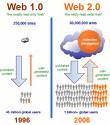
I am part of a learning program called Learning 2.0. The aim of it is to let Library staff become familiar with Web 2.0 technologies which improves communication over the Web. Web 2.0 technologies are things such as webblogs (which you have accessed to be reading this), social bookmarking, wikis, podcasts, RSS feeds (and other forms of many to many publishing). Other Web 2.0 technologies include online web services such as eBay and Gmail. These are much better than read-only websites because people can upload as well as download. The phrase "Web 2.0" can also refer to the transition of websites from isolated information stand alone websites to an interlinked computing platform that acts like software to the user. Web 2.0 also includes a social element where users generate and distribute content, often with freedom to share and re-use.
A blog (a portmanteau of web log) is a website where entries are written in chronological order and commonly displayed in reverse chronological order. "Blog" can also be used as a verb, meaning to maintain or add content to a blog. Many blogs provide commentary or news on a particular subject such as food, politics, or local news; others function as more personal online diaries. A typical blog combines text, images, and links to other blogs, web pages, and other media related to its topic. The ability for readers to leave comments in an interactive format is an important part of many blogs. Most blogs are primarily textual, although some focus on art (artlog), photographs (photoblog), sketchblog, videos (vlog), music (MP3 blog), audio (podcasting) or sexual topics (Adult blog), and are part of a wider network of social media. Micro-blogging is another type of blogging which consists of blogs with very short posts.
Social bookmarking is a way for Internet users to store, organize, share and search bookmarks of web pages. In a social bookmarking system, users save links to web pages that they want to remember and/or share. These bookmarks are usually public, but depending on the service's features, may be saved privately, shared only with specific people or groups, shared only inside certain networks, or another combination of publicness and privateness. The allowed people can usually view these bookmarks chronologically, by category or tags, via a search engine, or even randomly. Most social bookmark services encourage users to organize their bookmarks with informal tags instead of the traditional browser-based system of folders, although some services feature categories/folders or a combination of folders and tags. They also enable viewing bookmarks associated with a chosen tag, and include information about the number of users who have bookmarked them. Some social bookmarking services also draw inferences from the relationship of tags to create clusters of tags or bookmarks. Many social bookmarking services provide web feeds for their lists of bookmarks, including lists organized by tags. This allows subscribers to become aware of new bookmarks as they are saved, shared, and tagged by other users. As these services have matured and grown more popular, they have added extra features such as ratings and comments on bookmarks, the ability to import and export bookmarks from browsers, emailing of bookmarks, web annotation, and groups or other social network features.


A wiki is a medium which can be edited by anyone with access to it, and provides an easy method for linking from one page to another. Wikis are typically collaborative websites, though there are now also single-user offline implementations. Ward Cunningham, developer of the first wiki, WikiWikiWeb, originally described it as "the simplest online database that could possibly work" One of the best-known wikis is Wikipedia.


A podcast is a digital media file, or a series of such files, that is distributed over the Internet using syndication feeds for playback on portable media players and personal computers. The term, like "radio", can refer either to the content itself or to the method by which it is syndicated; the latter is also termed podcasting. The host or author of a podcast is often called a podcaster. The term "podcast" is a portmanteau of the words "iPod" and "broadcast", the Apple iPod being the brand of portable media player for which the first podcasting scripts were developed (see history of podcasting). These scripts allow podcasts to be automatically transferred to a mobile device after they are downloaded. Though podcasters' web sites may also offer direct download or streaming of their content, a podcast is distinguished from other digital media formats by its ability to be syndicated, subscribed to, and downloaded automatically when new content is added, using an aggregator or feed reader capable of reading feed formats such as RSS or Atom.


RSS is a family of Web feed formats used to publish frequently updated content such as blog entries, news headlines or podcasts. An RSS document, which is called a "feed", "web feed", or "channel", contains either a summary of content from an associated web site or the full text. RSS makes it possible for people to keep up with their favorite web sites in an automated manner that's easier than checking them manually. RSS content can be read using software called a "feed reader" or an "aggregator." The user subscribes to a feed by entering the feed's link into the reader or by clicking an RSS icon in a browser that initiates the subscription process. The reader checks the user's subscribed feeds regularly for new content, downloading any updates that it finds. For a more detailed discussion of these early developments, see the history of web syndication technology

Monday, October 1, 2007

COMBUSTION TECHNOLOGY

What amazes me is the advancement in technology of combustion. Our trains, tractors and cars used to run on steam. Nowadays they run on highly advanced combustion engines. Combustion type engines may one day be replaced by electricity driven engines.
Fascinating don`t you think?

Sunday, September 30, 2007

POST 2

Getting the hang of this thing now, I think. Hope to be putting some interesting stuff on here soon.

POST 1

Just trying to work out what this is all about. I am finding this exercise to be difficult. The instructions are not easy to follow. It is easy enough to navigate around the website, however, when it comes to posting a blog and knowing what to put into it, well that is another matter. I guess that is what learning is all about.

http://mysteryman07.blogspot.com/
Click link above for back to top